
Vector Files vs Raster Files: Which One is Best for DTF Printing?
In an era where DTF (Direct to Film) T-Shirt Printing dominates the market, the most frequently asked questions by clothing brand owners and customers to printing shops are, “What type of file should I send to ensure the print is clear?” Many have heard of Vector and Raster but are unsure of their differences and why sometimes a file that looks beautiful on a mobile device ends up pixelated or has white bleed when printed.
This article will help you understand the differences and choose the appropriate file types for various DTF printing tasks to achieve the best possible print quality.
1. Understanding Raster and Vector in the World of Printing
Raster (Pixels): Limited by the resolution of colored dots
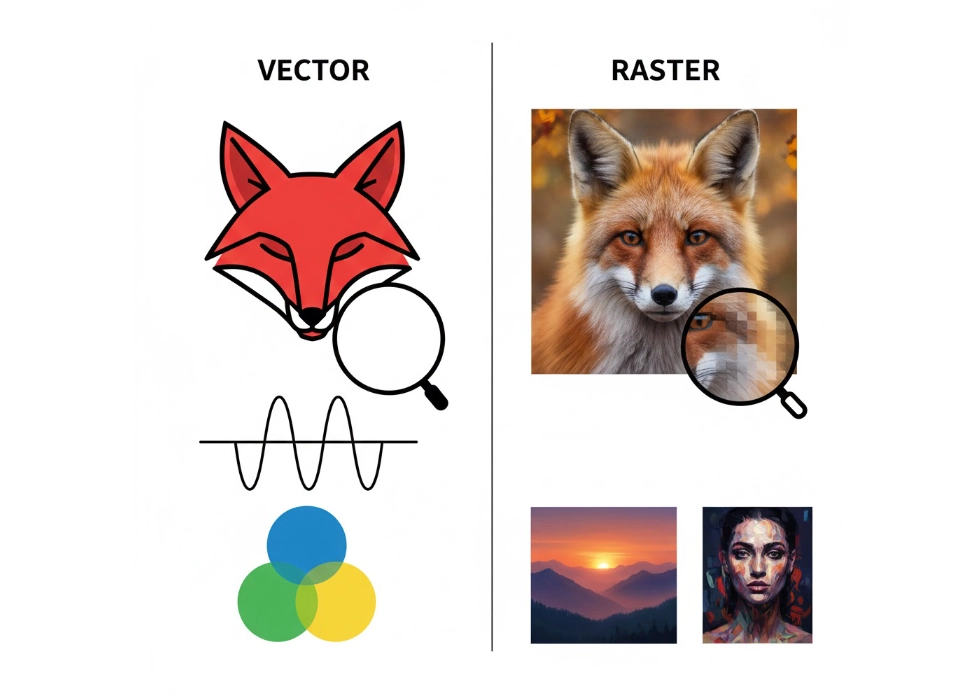
Raster files are composed of tiny colored dots called pixels. Common file formats include .JPEG, .PNG, .TIFF, and Photoshop (PSD) files.
Advantages: Excellent at capturing complex color details, such as photographs and digital paintings with smooth gradients.
Limitations: When enlarged beyond their original size, raster images become pixelated, resulting in jagged edges, which are detrimental to printing quality.
Vector (Lines): Infinite clarity
Vector files are created through mathematical calculations to form lines and shapes. Common file formats include .AI, .EPS, .PDF, and .SVG.
Advantages: Can be scaled to any size without losing quality, whether it’s as large as a house or as small as a coin, with edges remaining crisp and sharp.
Limitations: Cannot replicate realistic photographs as well as raster files, typically used for logos, text, and line art illustrations.
2. Why DTF Printing Requires Attention to File Types?
DTF printing uses high-resolution inkjet print heads (such as the i3200 heads used at screen168.com) to print designs. The precision of the print head in applying white ink underbase and color inks depends heavily on the edges of the file.
Blurry Edges: Using low-resolution raster files can confuse the print head about where to apply the white underbase, resulting in blurry or unsharp edges.
White Bleed: When the edges of the image are not clear, the white ink may bleed beyond the color ink, creating visible white borders, a difficult issue to resolve if the original file is not of high quality.
3. Choosing the Right File Type for Your Printing Style
a. Logos, Text, and Line Art
Must use Vector files
These types of designs require sharp edges. Using vector files allows the printer to accurately apply Choke (white ink underbase), ensuring the white ink is perfectly hidden under the color ink, resulting in premium quality prints similar to traditional silk screen but with the flexibility of DTF.
b. Photorealistic Images or Watercolor Paintings
Must use high-resolution Raster files (300 DPI)
You cannot convert a photographic portrait into a vector file that looks good. Therefore, use high-resolution raster files such as .PNG (transparent background) or .TIFF, ensuring the image is large enough and set to 300 DPI at the desired print size.
c. Gradients and Halftone
Raster (but must control Minimum Ink Dot)
Designs with gradients from dark to light that blend into the fabric require raster files with halftone or screen dot patterns to ensure the image looks smooth and does not easily peel off when washed.
4. Checklist: Preparing Files for DTF Printing to Achieve Perfect Results
To ensure your prints come out perfectly, here’s what to check before sending your files:
Color Mode: Use CMYK to ensure the colors match the actual printed colors as closely as possible.
Resolution: For raster files, ensure it is 300 DPI or higher.
Background: Always use transparent backgrounds to prevent AI or RIP programs from printing a white square background on the shirt.
Choke (White Ink Underbase): If sending vector files, the printer can easily manage the white ink underbase, reducing the risk of white bleed by 100%.
Fonts: For vector files, don’t forget to create outlines to prevent font distortion when opened on another machine.
5. Conclusion: Which is Better?
There is no one-size-fits-all answer; it depends on the type of work:
Use Vector: When you need precision, sharpness, and solid colors.
Use Raster: When you need artistic effects, color gradients, and realistic images.
In T-shirt printing, the first step is ensuring the file type matches the type of print job. The quality of the original file directly affects the clarity, color accuracy, and durability of the print. Using low-quality, poorly colored, or unsupported file formats can result in blurry prints, color inaccuracies, or printing issues. Therefore, preparing files that fit the printing system, whether it’s traditional silk screen, DTF, or other digital systems, is a crucial step in achieving the highest print quality and meeting the desired standards.
Ready to Print Custom DTF with Screen168 Bangkok?
Single pieces to bulk wholesale. Free artwork file check and instant online pricing 24/7.
🚀 View Sizes, Prices & Order Online→