
Unlocking the Highest Quality: How to Set Up Your DTF Printer Heater for 'No Smearing Ink' and 'Not Too Dry Film'
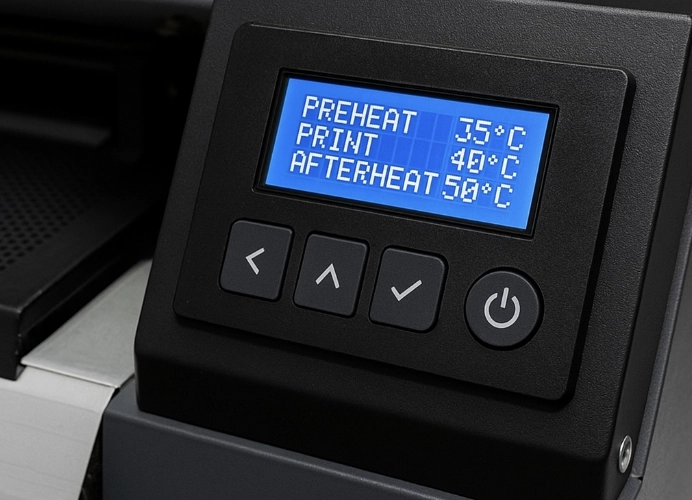
The Importance of the Heater (Pre-Heating System) in DTF Printing
In the DTF (Direct-to-Film) printing process, the heater, also known as the film warming system, plays a crucial role beyond just warming. It controls the stability of the ink, especially the high-viscosity White Ink. A precisely calibrated heater improves print quality significantly. Incorrect settings can lead to two major issues: ink bleeding and ink clogging before the hot-melt adhesive powder is applied.
One of the common problems faced by DTF T-shirt printing shops is ink bleeding or ink drying too quickly after printing, which directly affects the quality, sharpness, and durability of the printed image. This issue is often caused by improper heater settings on the printer. This article will provide a detailed explanation of how the heater works, how to set it according to environmental conditions and ink types, and maintenance tips to ensure your shop prints at the highest quality.
Understanding the Heater System in DTF Printers
What is a Heater?
The heater in a DTF printer ensures that the film and ink are at the right temperature, allowing the ink to set properly without bleeding or drying prematurely.
Heater Locations
- Pre-heater: Warms the film before printing
- Print-bed heater: Controls temperature during printing
- Post-heater: Helps set the ink after printing
Why Temperature Settings Are Important
If the temperature is too low, the ink will flow and bleed, causing blurry print lines.
If the temperature is too high, the ink will dry before fully adhering to the film, leading to color separation or cracking.
Factors Affecting Heater Settings
-
Ink Type
CMYK ink and White Ink have different setting points. Lower quality ink may require lower temperatures due to rapid evaporation.
-
Film Thickness and Type
Thicker films require more heat. Thinner or specially coated films should use lower heat settings.
-
Environmental Conditions
Rooms with air conditioning or cooler temperatures may require slightly higher heater settings.
High humidity slows down ink drying.
-
Printing Speed
Faster printing requires more heat.
Slower printing requires less heat.
How to Set the Heater for Optimal Performance
The best way to set the heater in a DTF printer is to find a balance between a high enough temperature to control ink flow but not so high that the ink dries prematurely.

-
Pre-heater and Print-bed: If the ink is still bleeding, gradually increase the temperature by 1-2 degrees Celsius to help the solvent in the ink evaporate quickly, allowing the ink to start setting and maintaining its shape on the film.
-
If the ink is still bleeding, check if the Pre-heater and Print-bed settings are too low and reduce the printing speed slightly.
Setting the Temperature for “Film Not Drying Too Quickly” (Too High Temp)
Problems such as ink drying or clogged print heads occur when the heater temperature is too high, causing the ink (especially White Ink) to dry and harden quickly on the film surface or at the print head edges.
-
Observations: If you notice white voids or uneven lines after printing, suspect that the temperature may be too high.
-
Adjustments: If the ink dries too quickly, reduce the temperature by 1-3 degrees Celsius and check the room humidity (should be 45% - 65% RH). Low humidity can cause ink to dry much faster, even with correct heater settings.
-
If the ink is still drying too quickly, reduce the Post-heater setting and check if the fan or blower in the printer is too strong.
Additional Factors Affecting Heater Temperature
In addition to adjusting the numbers on the screen, other factors must be considered when setting the heater:
| Related Factors | Impact on Temperature Settings | Adjustment Guidelines |
|---|---|---|
| Printing Speed | Faster printing = Higher heat required | Ensure ink has time to set |
| Ink Volume | Thicker ink = Higher heat required | Speed up ink evaporation |
| Room Temperature/Humidity | Cooler/Higher humidity = May need to increase heat | Help remove moisture from the film |
| DTF Film Type | Different films may require different heat settings | Test and follow manufacturer’s recommendations |
Maintenance for Stable Heater Operation
- Clean the heater and temperature sensors weekly.
- Check fans and airflow direction.
- Update heater control firmware/software.
- Use stable power plugs with grounding.
FAQ: Frequently Asked Questions
Q: Do you need to set the heater every day?
A: Check the temperature before printing, especially if the weather changes.
Q: What if only the White Ink is bleeding?
A: Reduce the printing speed and slightly increase the Pre-heater setting.
Q: Can an external temperature gauge help?
A: Yes, it can help verify the accuracy of the heater.
Conclusion: The Key to Perfect DTF Printing
Properly setting the heater is a quality investment that should not be overlooked. Testing small prints at different temperature intervals (2-3 degrees apart) will help you find the “sweet spot” that works best for your printer and shop environment, ensuring your DTF prints are sharp, bleed-free, and consistently high quality.
Understanding the factors affecting ink setting, starting with mid-range settings, making small adjustments, and keeping records will help you effectively avoid ink bleeding and drying issues, leading to customer confidence in your shop’s printing quality.
Ready to Print Custom DTF with Screen168 Bangkok?
Single pieces to bulk wholesale. Free artwork file check and instant online pricing 24/7.
🚀 View Sizes, Prices & Order Online→