
How to Organize Blank T-Shirts in Your Screen Printing Store to Avoid Overordering

Managing inventory is crucial for any business, whether it’s a small or large store. If you own a t-shirt printing shop, one common problem you might face is the lack of systematic management of blank t-shirts, leading to unnecessary over-ordering or, conversely, stockouts without realizing it. Blank t-shirts are a primary raw material, and poor management can result in issues such as over-ordering, unnecessary expenses, or stock shortages for certain sizes, preventing you from accepting customer orders.
This article will delve into professional methods for organizing blank t-shirt inventory to help you save costs and maximize operational efficiency.
1. Why is Organizing Blank T-Shirt Inventory Important?
Many people may overlook the importance of inventory management, thinking that simply remembering what you have is enough. However, poor inventory management can have several negative impacts on your business, such as:
Wasting budget: Unnecessary reordering of blank t-shirts ties up your funds in unsold inventory.
Wasting storage space: Excessive stock takes up space and may make your workspace cluttered and disorganized.
Reducing financial liquidity: Money that should be circulating in your business is tied up in unsold t-shirts.
Missing sales opportunities: If you run out of certain sizes or colors of blank t-shirts without realizing it, you may miss out on customer orders.
Wasting time: Having to manually check inventory without a system in place makes it take longer to locate each item.
Therefore, good inventory organization is like a worthwhile investment, as it helps reduce costs, increase efficiency, and ensures smooth business operations.
2. Starting to Organize Blank T-Shirt Inventory from Scratch
If you don’t have an inventory management system yet, don’t be discouraged. You can start easily with the following steps:
Assign product codes (SKU): Create specific codes for each type of blank t-shirt, such as “TS-001-S-W” where TS stands for T-Shirt, 001 is the model number, S is the size, and W is white. Assigning codes helps you quickly and accurately locate items.
Clearly categorize products: Group t-shirts by type, such as t-shirts, polo shirts, long-sleeve shirts, and hoodies. Then further categorize by size and color to make storage and retrieval organized. Mixing t-shirts together makes counting and locating them difficult and time-consuming. Store blank t-shirts in separate shelves or boxes by color and size, and clearly label them.
Utilize storage space effectively: Allocate space in your store appropriately for storing blank t-shirts. Use shelving units, drawers, or clear plastic boxes to make items easily visible and dust-free.
3. Stock Management System to Prevent Ordering Duplication
Once the basics are organized, the next step is to introduce a system to help manage your inventory, allowing you to track stock accurately and in real-time.
Create a clear inventory record system
Many screen printing shops still rely on memory or handwritten notes, which can lead to mistakes and oversights. It’s better to switch to an inventory management program or an Excel file that records all the necessary information, such as:
Product codes or color codes (e.g., W-001 = white shirt, BK-002 = black shirt)
Sizes (S, M, L, XL, XXL), remaining quantity, date of receipt and date of issue. This system will allow you to immediately see how much stock is left and whether you need to place an order.
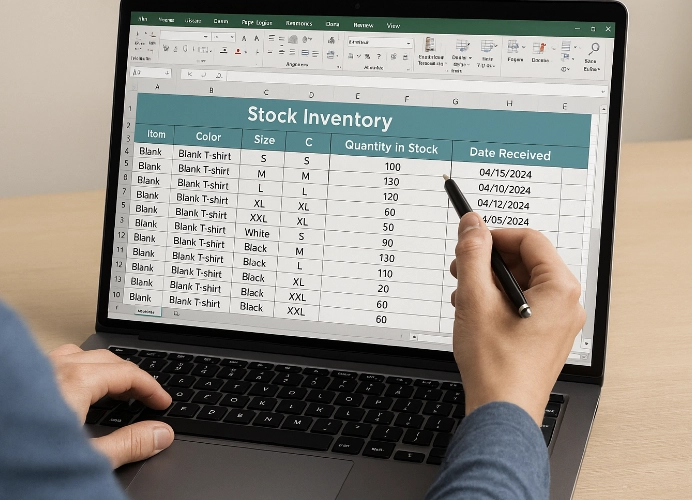
Record keeping with Excel: This is the easiest and most cost-effective method. Start by creating a table in a notebook or Excel. When a shirt is taken out for use, immediately subtract the quantity from the list. Although this method requires consistency, it’s a good starting point.
Use inventory management software: As your business grows, using specialized inventory management software can greatly simplify your work. These programs often have various features such as low stock alerts, sales summary reports, and purchase order history, giving you a clear overview of your stock.
Use a barcode system: This is another way to reduce errors from manual record-keeping. You can attach barcodes to each blank shirt. When a shirt is used, simply scan the barcode to deduct stock, which saves time and increases accuracy.
4. Set Reorder Points
To prevent running out of blank shirts without realizing it, you should set a “reorder point,” which is the minimum stock level at which you must order a new batch of shirts immediately.
Example: If you set a reorder point for white t-shirts in size M at 20 pieces, when the stock level drops to 20 pieces, you must order more shirts immediately to meet customer demand. This prevents over-ordering and stockouts, and helps you manage your finances better.
Advice: Setting reorder points should take into account several factors, such as the delivery time from suppliers, average monthly sales volume, and customer demand.
5. Regular Cleaning and Stock Counting

Even with a good system in place, stock counting remains a crucial task that should be done regularly, whether monthly or quarterly. Stock counting helps you:
Verify accuracy: Compare the actual quantity of items with the system records to identify any discrepancies.
Discover damaged or defective items: Items stored for a long time may deteriorate. Stock counting helps you isolate unusable items.
Plan future orders: Based on the stock count data, you can efficiently plan orders for future seasons.
6. Use Status Tags “Ready” and “Needs Inspection”

In a screen printing shop, some batches of shirts may have defects or faded colors. It’s important to separate boxes into “Ready” and “Needs Inspection” to avoid using problematic shirts for customer orders and to prevent unnecessary reorders due to stock shortages.
7. Establish a Shirt Issuance System
If multiple people work in the shop, clear procedures for shirt issuance should be established, such as:
Sign out in a logbook or system each time
Specify the job or customer using the shirts
Update stock immediately after issuance
This ensures that stock records closely match actual inventory levels.
8. Use Low-Stock Alert Systems

Currently, there are apps and programs that can alert you when stock reaches a minimum reorder point or when it is depleted. This helps you avoid constantly checking manually and reduces the risk of missing orders.
9. Building Good Relationships with Suppliers
Having good suppliers is like having business partners. If you have a good relationship with your suppliers, you will receive information about new stock or even get assistance in emergencies.
Communicate Regularly: Ask about new products or inform them of your future needs so that suppliers can prepare the goods for you in a timely manner.
Plan Orders Together: If you have large orders that require a lot of blank shirts, consulting with your suppliers in advance will ensure that you have enough stock to meet your needs.
Summary
Organizing blank shirt stock in a screen printing shop is not difficult, but it requires consistency and dedication. It’s not just about neatness, but also about efficiently managing costs and time. Starting with assigning product codes and clearly categorizing them, followed by implementing a system such as Excel or stock management software, will make your inventory management easier and more organized.
Remember, “good inventory management is the best investment,” as it helps you save time, reduce costs, and increase profitability for your screen printing business sustainably.
Ready to Print Custom DTF with Screen168 Bangkok?
Single pieces to bulk wholesale. Free artwork file check and instant online pricing 24/7.
🚀 View Sizes, Prices & Order Online→