
Why White Choke is Important in DTF Printing? Professional Techniques to Solve Overflow Glue Issues
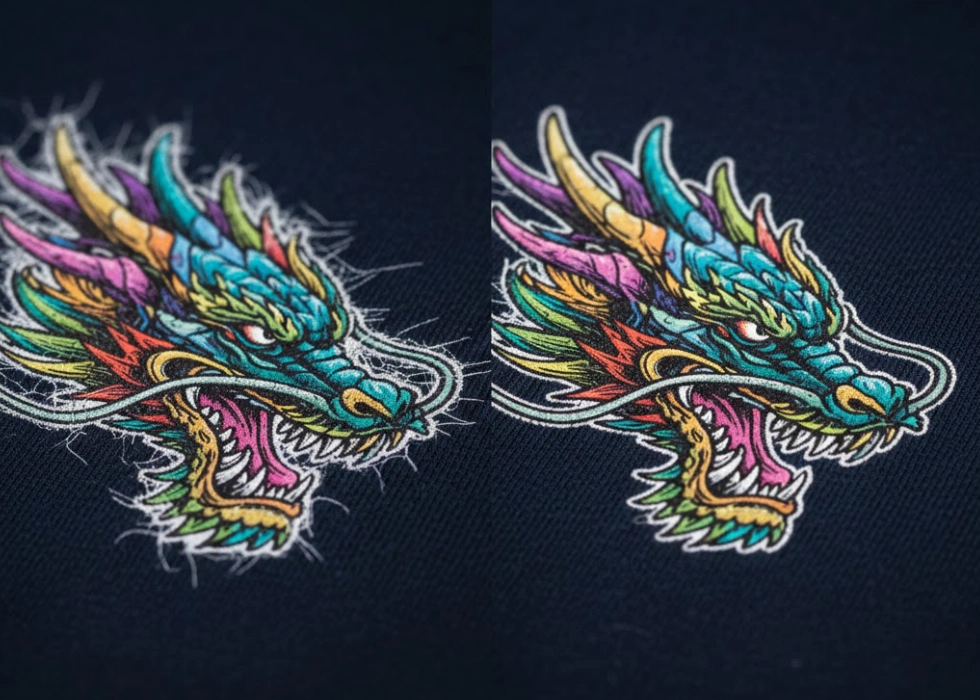
In an era where DTF (Digital Transfer Film) printing has become the heart of the garment industry, the most common and frustrating issue that screen printers and shop owners face is the “over-spread adhesive” problem, or “white ink bleeding,” which results in white ink edges protruding outside the image, making the work look unprofessional and lowering its value.
Today, we will delve into the technique of “Choke” (reducing white ink edges), a crucial method that helps make your DTF T-shirt prints look sharp, clear, and high-end, akin to branded products.
1. What is Choke? Why Should You Know About It?
In DTF printing, we first print the color ink (CMYK) and then apply the white ink underbase to serve as a base for the hot-melt adhesive powder. If the white ink is set to the exact size of the color image, there is a high chance that the white ink will bleed out due to various factors such as print head pressure, ink expansion, or the timing of applying the adhesive.
Choke is a technique that instructs the white ink layer to “shrink” slightly (usually by 1-3 pixels) so that the CMYK color ink edges completely cover the white ink. The result is a crisp image with no white ink edges to distract the viewer.
2. Why is “White Ink Bleeding” a Nightmare for Screen Printers?
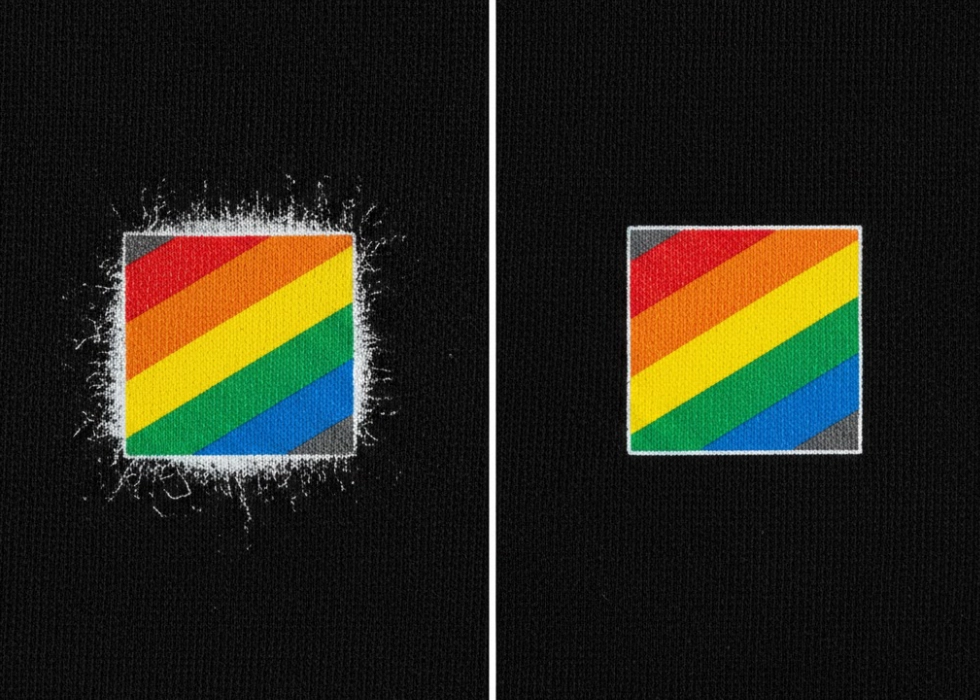
The over-spread of adhesive or white ink not only affects the aesthetics but also has other impacts:
- Lack of Value: Premium customers will immediately reject the work if they see white edges around cartoons or logos.
- Adhesion Issues: If white ink bleeds out without color ink covering it, the white edges may peel off easily when heat pressed.
- Difficult to Clean Up: Especially on dark or black shirts, white edges will be very noticeable (high contrast), making the work look messy.
3. Main Causes of White Ink Bleeding
Before we look at solutions, we need to understand why it happens:
- Heat and Humidity: Affect the drying of ink and the adhesion of adhesive powder.
- RIP Software Settings: Many shops use default settings without customizing them according to the image details.
- Quality of Adhesive Powder: Fine powder may over-extend beyond the image edges if the ink hasn’t set properly.
- Air Pressure: During the shaking or dusting process, if the pressure is insufficient, the adhesive may remain at the white ink edges.
4. Techniques for Choke and Easy Solutions to Over-Spread Adhesive
Method 1: Adjusting Through RIP Software (Recommended)
Most RIP software (such as Digital Factory, AcroRIP, or Maintop) comes with a White Underbase Choke or White Outset function.
Tip: Set the Choke value to approximately 2-4 pixels (depending on DPI). This is the easiest method as the software calculates automatically for every image.
Method 2: Manual Choke in Adobe Photoshop
For high-detail work (such as hair or tiny text), adjusting in RIP may not be enough. You should create the file manually:
- Create a selection around the image.
- Go to Select > Modify > Contract.
- Enter 1-2 pixels to shrink the selection.
- Use this area to create a layer specifically for white ink.
Method 3: Controlling White Ink Density
Sometimes, bleeding occurs not because the edges are too wide but because the “white ink is too thick,” causing it to seep out.
Solution: Try reducing the white ink from 100% to 80-90% in areas that don’t require high opacity. This helps reduce the bulge and bleeding of the adhesive.
5. Additional Tips: Shaking (Dusting) A Crucial Step Often Overlooked
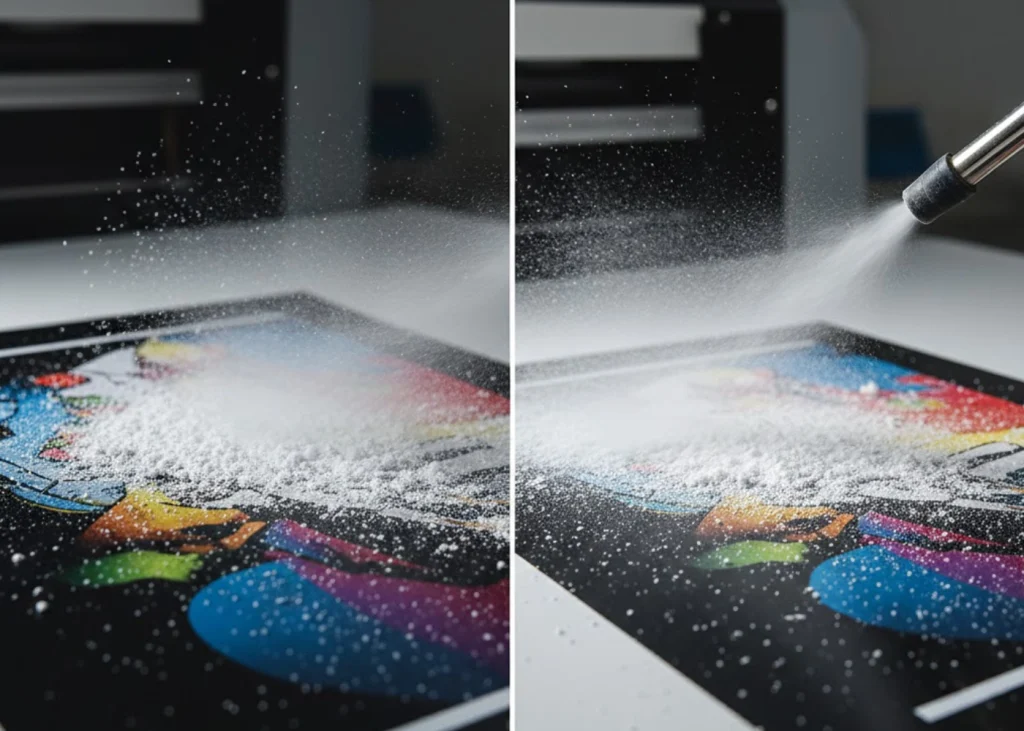
Even if you do a good Choke, if the “shaking” step is not done cleanly, excess adhesive powder that clings to the edges of the image (even where there is no ink) will be heat pressed onto the shirt, resulting in clear adhesive spots or blurry white edges around the image.
Technique: If using an automatic powder shaker, adjust the shaking force appropriately. If shaking by hand, gently tap the film at the back until you are sure no powder remains in areas without ink.
The benefits of proper Choke include saving time from cleaning up, customer satisfaction leading to referrals and repeat orders, and extending the lifespan of the shirt (edges won’t peel off easily).
Moreover, paying attention to Choke and solving over-spread adhesive issues distinguishes “general screen printing shops” from “professional screen printing shops.” Sharp-edged work makes your prints look like high-quality traditional silk screen prints or factory-made branded products.
Ready to Print Custom DTF with Screen168 Bangkok?
Single pieces to bulk wholesale. Free artwork file check and instant online pricing 24/7.
🚀 View Sizes, Prices & Order Online→