
Capping Station: The Small Detail That Causes DTF Print Head Clogs
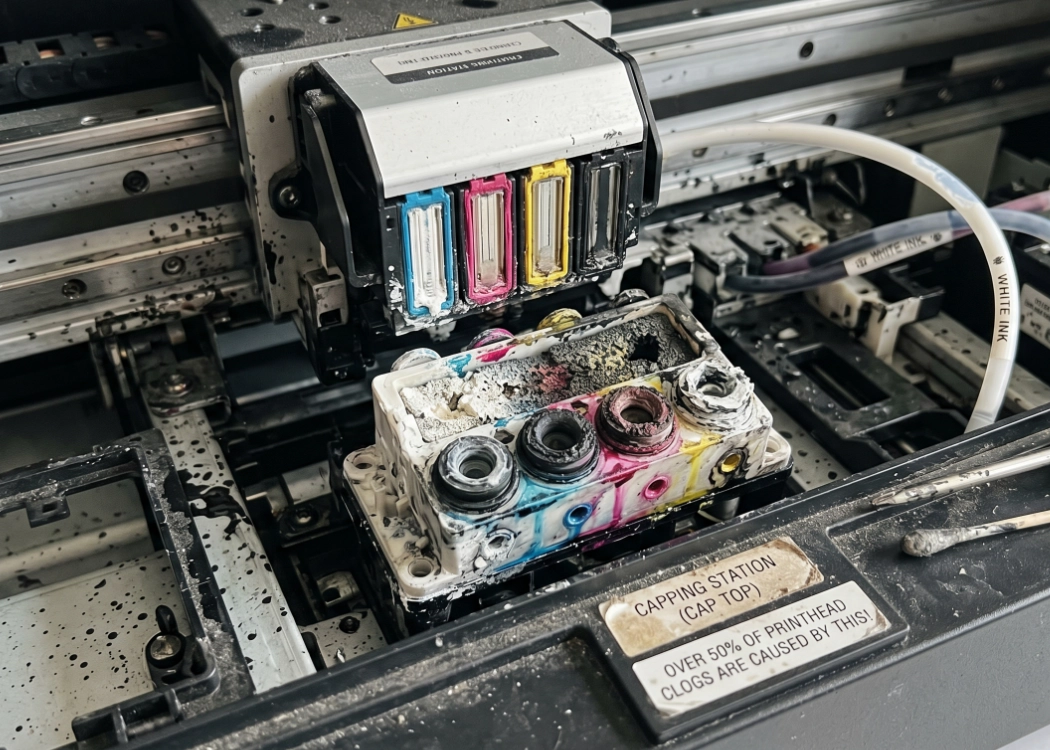
For those running a DTF (Direct to Film) T-shirt printing shop, when faced with issues like “clogged printhead,” where printing results in missing colors, incomplete white ink, or where cleaning the head (Head Cleaning) doesn’t help, the first instinct of most printers usually points to the “printhead” or the quality of the “ink,” assuming it has settled.
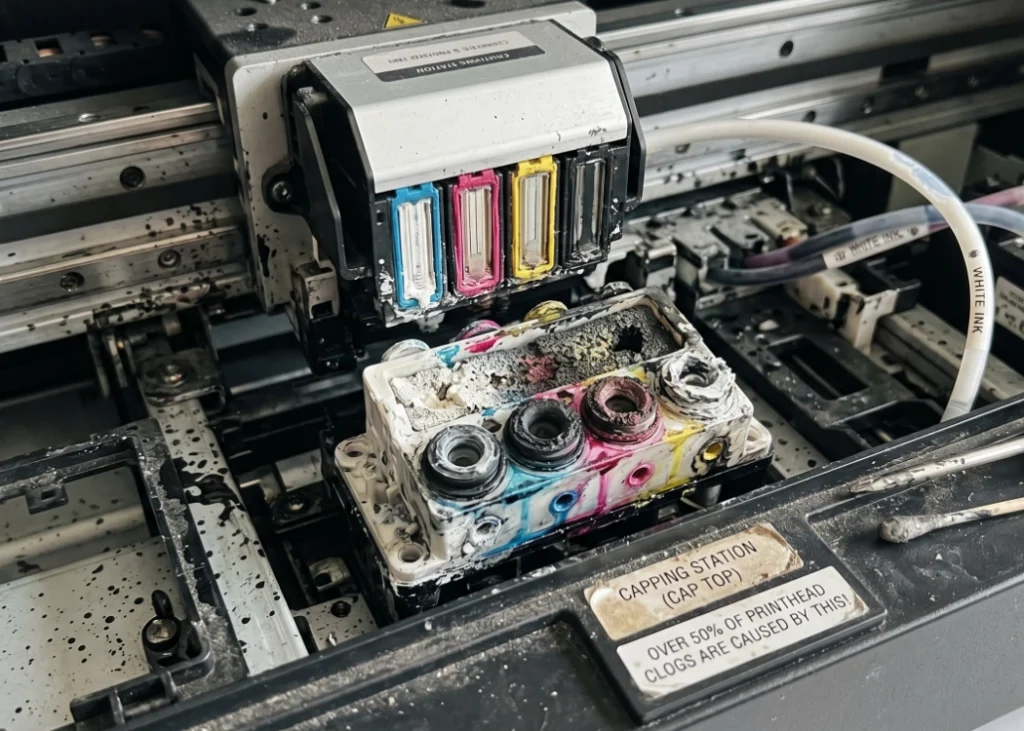
But did you know that over 50% of persistent printhead clogging issues do not stem from a faulty printhead or poor-quality ink, but rather from a small plastic part hidden beneath the printhead, known as the “Capping Station” (or Cap Top).
Today, Screen 168 will delve into the importance of this component, explaining what it is, what it does, and why overlooking this small detail could cost you thousands of THB to prematurely replace your printhead.
What is the Capping Station (Cap Top)?
The Capping Station, often referred to by technicians as “Cap Top,” is the station where the printhead rests when the printer is idle. When the printer is not in use, the printhead retracts to the home position and aligns perfectly with the Capping Station.
It is a small rectangular tube containing a sponge that absorbs ink, and around it is a “rubber lip.” The primary functions of the Capping Station are crucial to the DTF system:
Creating an airtight seal: The rubber lip of the Cap Top seals tightly against the printhead plate, preventing external air from coming into contact with the ink nozzles, thus preventing the ink from drying and clogging the nozzles.
Connecting the suction pad: When you initiate a Head Cleaning from the computer, a vacuum pump below the printer works by creating suction through the Capping Station, pulling out any ink residue that is clogging the printhead and depositing it into the waste ink tank.
How does the Capping Station cause DTF printhead clogging?
The scary aspect of DTF printing is the use of “white ink,” which contains titanium dioxide and dries quickly. If your Capping Station is in poor condition, it can cause a domino effect that damages the printhead:
Worn rubber lip: Over time, the rubber lip of the Cap Top may deform, deteriorate, or accumulate dried white ink residue. When the printhead retracts to align with the Cap Top, it fails to create a tight seal. With any gaps, air enters and reacts with the ink on the printhead, causing rapid nozzle clogging.
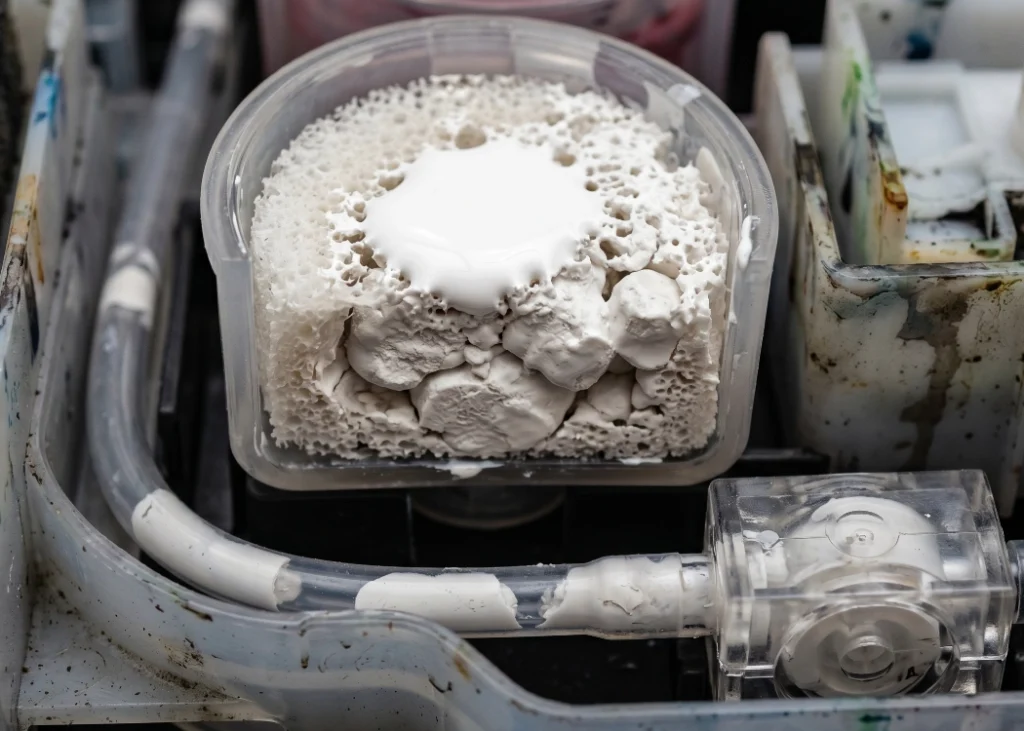
Blocked sponge: If the sponge in the Cap Top is clogged with hardened white ink residue, when you initiate a Head Cleaning, the vacuum pump cannot draw ink through the blocked sponge, resulting in no suction. This means that even after multiple cleaning cycles, the ink does not get drawn out, leaving the printhead clogged.
How to detect Capping Station issues
To prevent printhead damage, printers should be vigilant for these signs:
No ink flow during cleaning: If you initiate a strong Head Cleaning and there is no ink flowing into the waste ink bottle, or only a small amount flows, it indicates that the Cap Top or the lower vacuum pump is clogged.
Dry ink residue around the rubber lip: If you see thick layers of dried white ink residue around the rubber lip of the Cap Top, it is a serious warning sign.
Frequent printhead clogging: If the printhead is clogged even after a full cleaning cycle and remains clogged after just 1-2 hours of downtime, it usually indicates that air is entering due to a poor seal from the Cap Top.
Maintaining the Capping Station for Longevity
Maintaining this component is simple and takes less than 2 minutes daily:
Apply printhead cleaning solution: After each work shift or before shutting down the printer overnight, use a syringe to apply cleaning solution to the sponge of the Capping Station. This solution helps dissolve white ink residue, preventing it from hardening on the sponge and rubber lip.
Gently clean the rubber lip: Use lint-free swabs (Cleanroom Swabs) moistened with cleaning solution to carefully clean around the rubber lip of the Cap Top (do not use regular cotton swabs as lint can stick to the printhead). Clean until the rubber lip is free of ink residue.
Replace according to usage: The Capping Station is considered a “consumable part” and is not designed to last indefinitely. For heavily used DTF printers, Cap Top replacement should occur every 3-6 months or immediately if you notice the rubber lip is deformed.
In the DTF garment printing system, every component works together as a system. The Capping Station, though a small, inexpensive part, is the “protector” that shields your expensive printhead. Taking a few minutes each day to clean and maintain the Cap Top can help prevent printing interruptions, color loss, and extend the life of your printer.
Ready to Print Custom DTF with Screen168 Bangkok?
Single pieces to bulk wholesale. Free artwork file check and instant online pricing 24/7.
🚀 View Sizes, Prices & Order Online→